Expressions
Throughout this guide, we've been using Expressions — those {{ }} wrapped values that let us access inputs, outputs, and other dynamic data. We've touched on them loosely, using simple expressions like {{ inputs.name }} and {{ outputs.make_request.code }}. But expressions are far more powerful than simple variable access.
Kestra's expression engine combines the Pebble templating engine with the execution context, giving you a rich set of capabilities for transforming and manipulating data within your flows. Let's explore what else you can do.
What You Can Access
Expressions give you access to the entire execution context:
{{ inputs }}— flow inputs{{ outputs }}— task outputs{{ flow }}— flow metadata (id, namespace, revision){{ execution }}— execution metadata (id, start date, state){{ trigger }}— trigger information (when using triggers)
Filters and Functions
Beyond simple access, you can transform data using filters and functions. For example:
Convert strings to number type:
{{ "12.3" | number }}returns 12.3.Format dates:
{{ inputs.my_date | date("yyyy-MM-dd") }}returns the date in this format: 2026-02-12.Parse and manipulate JSON:
{{ {"value": [1, 2, 3]} | jq(".[][1]") | first }}returns 2.Perform calculations:
{{ 1 + 2 }}returns 3.
There are filters and functions for almost anything. For a complete reference of available expressions, filters, and functions, check out the Expressions Reference.
Debug Expressions
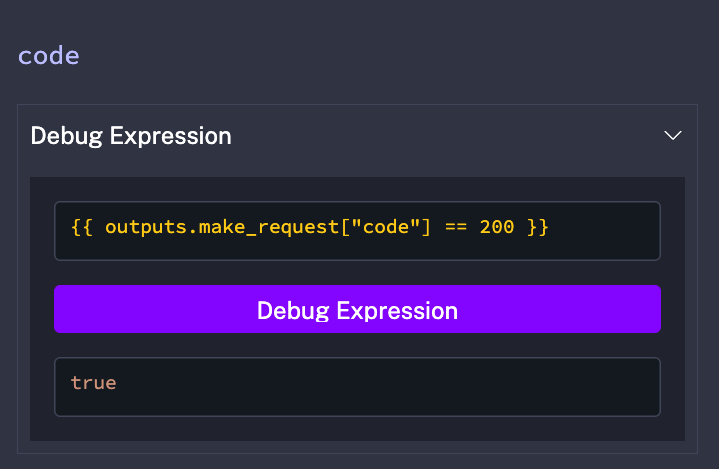
When building complex expressions, use the Debug Expressions feature in the Kestra UI to test and validate your syntax before running the flow. This helps you catch errors early and understand what data your expressions will return. You can find this from the Execution view under Outputs.
Expressions give you the power to transform and manipulate data throughout your flows. But so far, our flows have been running tasks in a simple sequence. What if you need conditional logic - running different tasks based on an HTTP status code? Or looping through a list of items? That's where flowable tasks come in. They use expressions to make decisions about how your workflow executes, giving you full control over your orchestration logic.