Flowable Tasks
So far, all our flows have run tasks sequentially — one after another in a straight line. But real-world workflows often need more sophisticated patterns. What if you only want to run certain tasks when a condition is met? What if you need to process a list of files, running the same tasks for each one? What if you want multiple tasks to run at the same time for better performance?
Flowable tasks give you this control. Unlike runnable tasks that perform computation, flowable tasks control how your workflow executes. They enable conditional branching, loops, parallel execution, and more — turning simple sequential flows into sophisticated orchestration logic.
Types of Flowable Tasks
Kestra provides several flowable task types for different orchestration patterns:
Conditional Tasks let you decide whether to run branches of your workflow based on a condition:
If — run tasks when a condition is true, with optional else branch
Switch — choose between multiple branches based on a value
Looping Tasks let you iterate through data:
ForEach — run a set of tasks for each value in an array
ForEachItem — run a subflow for each value in a file, better for large amounts of data for performance
LoopUntil — repeat the same tasks until a condition is met
Parallel runs multiple tasks at the same time for better performance.
Subflow lets you create reusable flows that other flows can trigger, like functions you can call.
There are several other flowable task types available — check the flowable tasks documentation for the complete list.
Using Conditional Logic
Let's improve our HTTP Request flow with conditional logic. Previously, we just logged the status code. Now we'll use an If task to provide different messages based on whether the request succeeded:
id: myflow
namespace: company.team

inputs:
  - id: uri
    type: URI
    defaults: https://kestra.io

tasks:
  - id: make_request
    type: io.kestra.plugin.core.http.Request
    uri: "{{ inputs.uri }}"

  - id: check_status
    type: io.kestra.plugin.core.flow.If
    condition: "{{ outputs.make_request.code == 200 }}"
    then:
      - id: log_success
        type: io.kestra.plugin.core.log.Log
        message: "Request successful"
    else:
      - id: log_error
        type: io.kestra.plugin.core.log.Log
        message: "Request was not successful: {{ outputs.make_request.code }}"
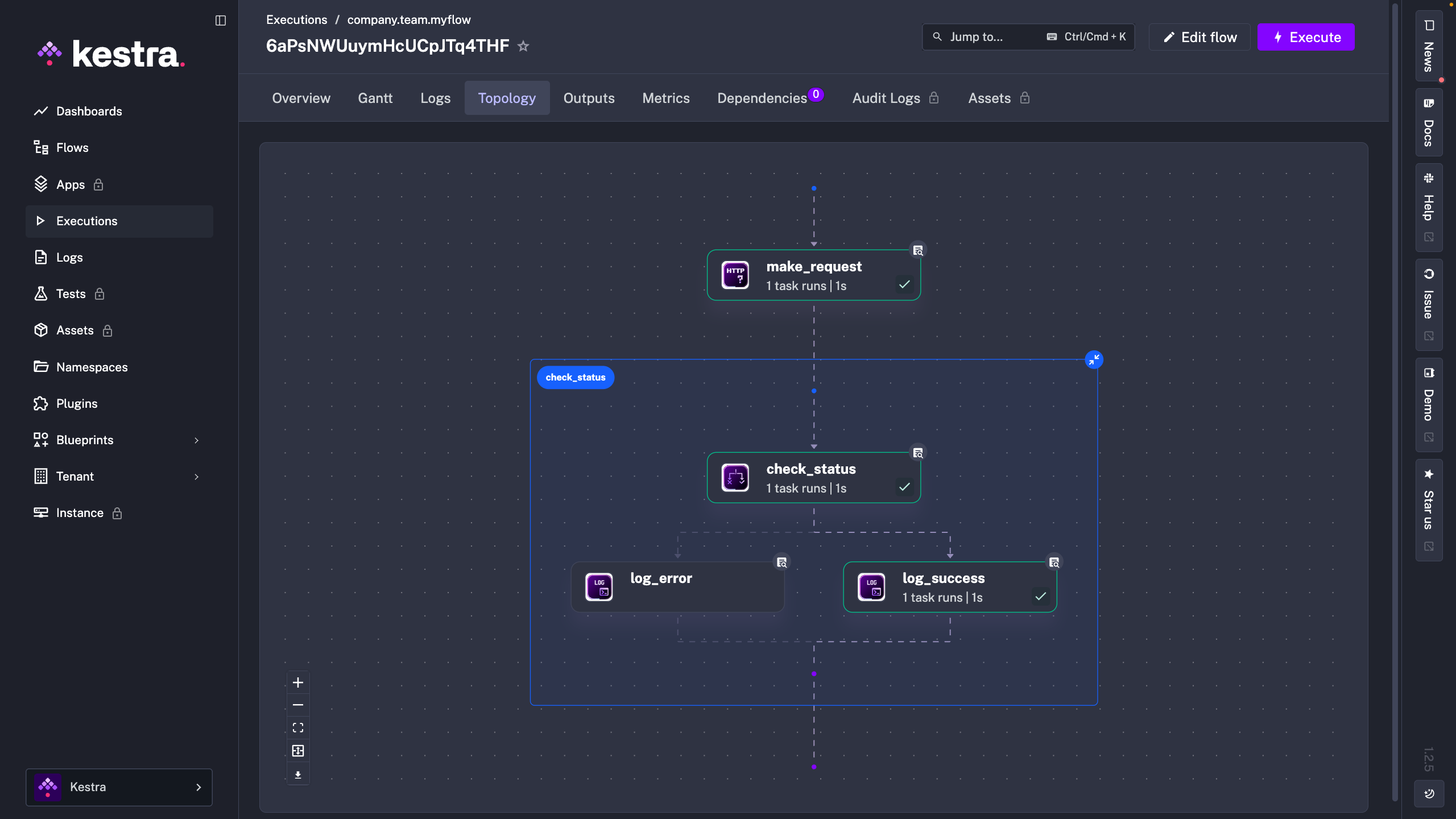
The If task evaluates the condition using an expression. If the status code is 200, it runs the tasks in the then branch. Otherwise, it runs the tasks in the else branch. This is where expressions and flowable tasks work together - expressions evaluate the data, and flowable tasks use that evaluation to control the workflow. You can view this by switching to the Topology tab:
Looping through data
What if you need to process multiple items with the same logic? Maybe you have a list of customer IDs and want to send each one through the same notification workflow, or an array of file paths where each file needs identical processing.
The ForEach task handles this neatly. It takes an array of values and runs a set of tasks for each item in that array. Let's see it in action with a simple example:
id: myflow
namespace: company.team

inputs:
  - id: data
    type: ARRAY
    itemType: INT
    defaults: [1,2,3,4,5]

tasks:
  - id: loop
    type: io.kestra.plugin.core.flow.ForEach
    values: "{{ inputs.data }}"
    tasks:
      - id: log_data
        type: io.kestra.plugin.core.log.Log
        message: "{{ taskrun.value }}"
The values property specifies the array to loop through. Within the loop, you can access the current item using {{ taskrun.value }} — this expression gives you the value for the current iteration. In this example, the log task will execute five times, once for each number in the array, logging 1, 2, 3, 4, and 5.
Subflows
As your workflows grow, you'll find yourself repeating the same sets of tasks across multiple flows. Subflows solve this by letting you package tasks into reusable components.
Think of subflows like functions in programming: define the logic once, then call it from anywhere. For example, you might create a subflow that handles error notifications by posting to both Slack and email. Instead of copying those two tasks into every flow that needs alerts, you can simply call your error notification subflow.
Let's take our HTTP request example and turn it into a subflow. First, we'll create the subflow itself:
id: mysubflow
namespace: company.team

inputs:
  - id: uri
    type: URI

tasks:
  - id: make_request
    type: io.kestra.plugin.core.http.Request
    uri: "{{ inputs.uri }}"

  - id: log
    type: io.kestra.plugin.core.log.Log
    message: "{{ outputs.make_request.code }}"

outputs:
  - id: data
    type: STRING
    value: "{{ outputs.make_request.code }}"
Notice the outputs section at the flow level — this is new. Just like tasks can produce outputs, entire flows can too. This subflow accepts a URI input, makes the request, logs the status, and returns the status code as a flow-level output that the calling flow can access.
Now any flow can call this subflow using the Subflow task:
id: myflow
namespace: company.team

tasks:
  - id: subflow
    type: io.kestra.plugin.core.flow.Subflow
    namespace: company.team
    flowId: mysubflow
    inputs:
      uri: https://kestra.io

  - id: log_status_code
    type: io.kestra.plugin.core.log.Log
    message: "{{ outputs.subflow.outputs.data }}"
The parent flow passes inputs to the subflow and can access its outputs using {{ outputs.subflow.outputs.data }}. This makes your workflows more maintainable — update the subflow once, and all flows that use it benefit from the changes.
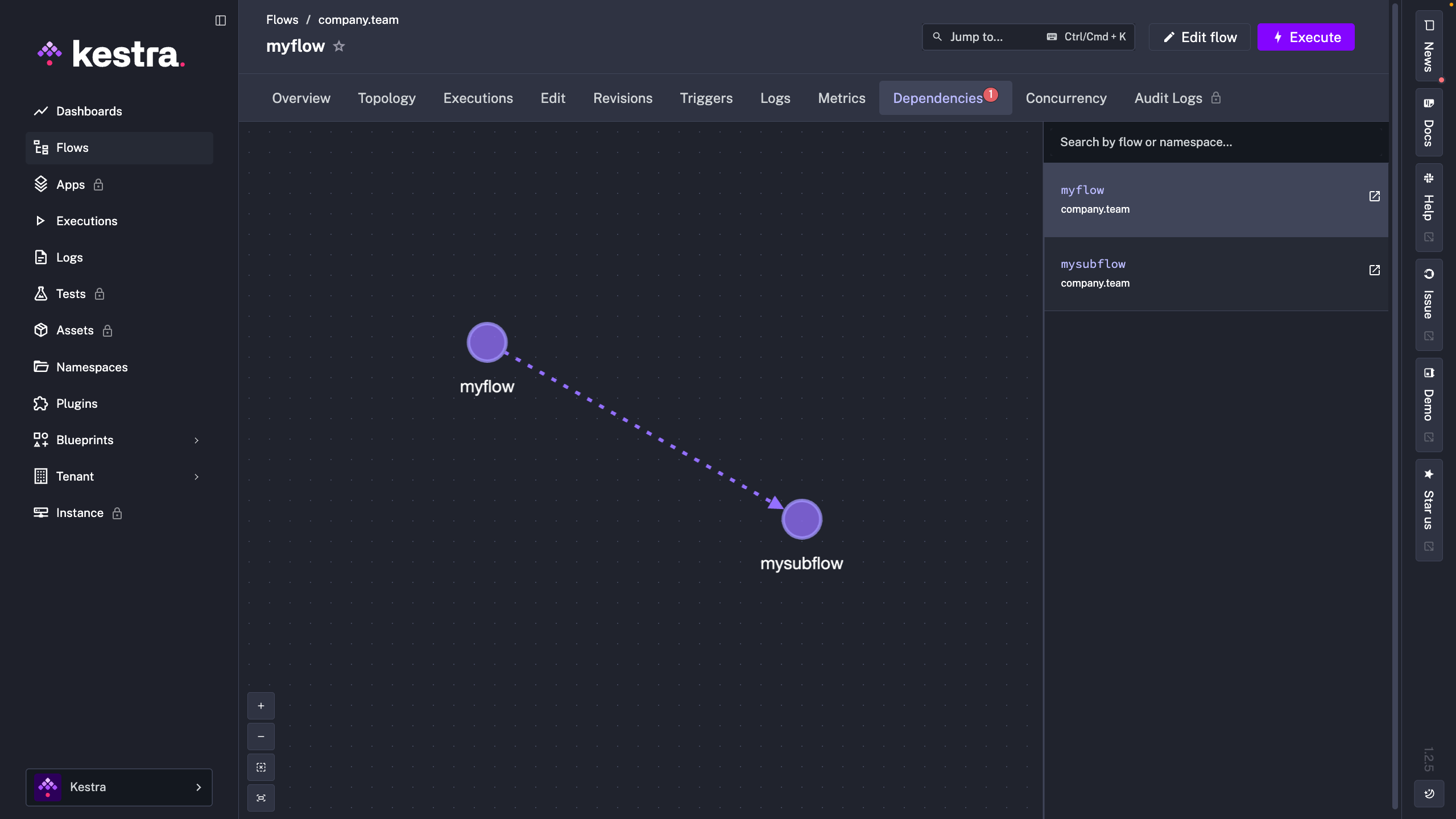
Kestra's Dependencies view shows which flows call which subflows, helping you understand your workflow architecture at a glance.
With flowable tasks, you can build workflows that adapt to different scenarios, process large datasets efficiently, and handle complex orchestration logic. They transform Kestra from a simple task runner into a sophisticated workflow orchestration platform.