Completion
Congratulations on completing Kestra Fundamentals! 🚀
Once you complete this page, you will be able to access your certificate. Click the link in the top left to view and download your certificate. You will also be sent an email with a link to access it.
If your name does not appear on the certificate, make sure you add it to your profile and try downloading the certificate again.
Add to LinkedIn
Want to show it off? Add it to your LinkedIn profile to let your network know you're levelling up your workflow orchestration skills.
Issuing organization, make sure to select the Kestra so the logo appears next to your certification.Credential IDcan be found in the bottom right of your certificate.Put the
Credential URLas the link to the course so others can easily take it: https://academy.kestra.io/kestra-fundamentalsAdd
Kestraunder Skills.Upload the PDF from Podia to the Media section and name it “Certificate of Completion.
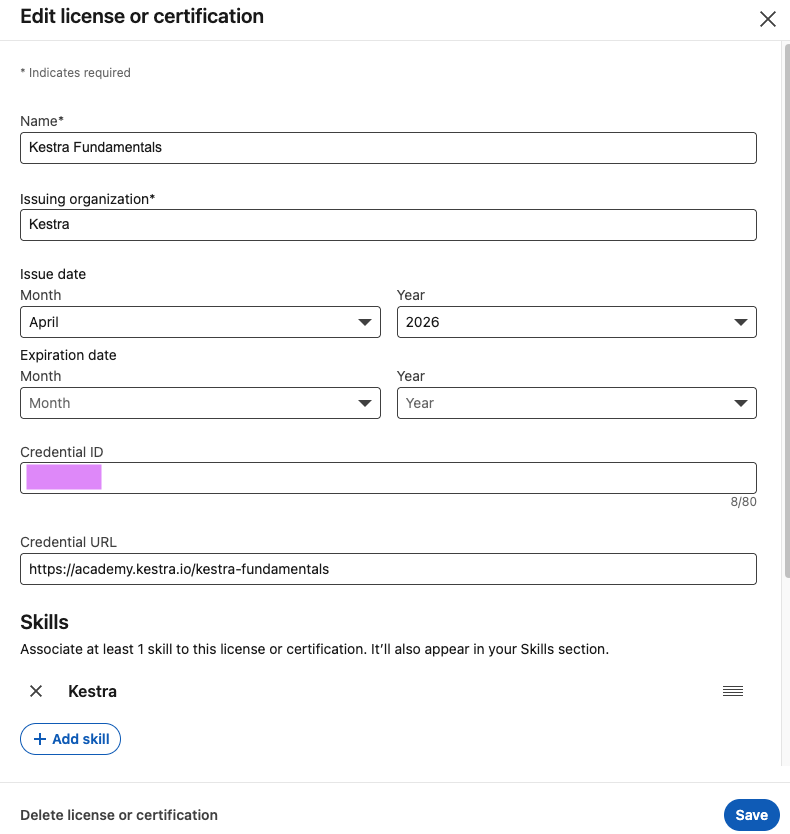
You can find more information about adding certifications here: https://www.linkedin.com/help/linkedin/answer/a567169.